Common eCoC Pitfalls: XML Validation Errors, Signature Issues and How to Avoid Them
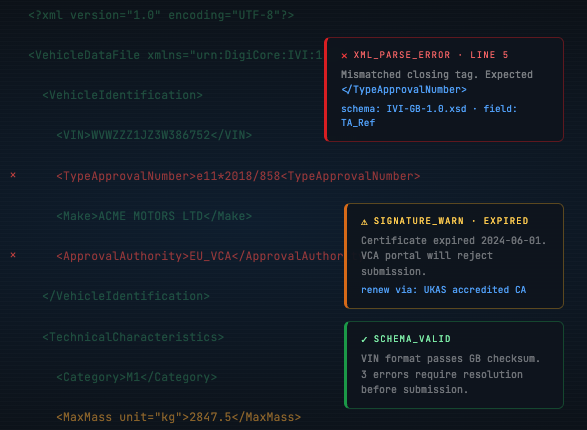
Why eCoC submissions fail
The VCA eCoC system performs automated validation on every submission. Files that fail the XSD schema check or have invalid digital signatures are rejected immediately. Understanding the most common failure modes — and building processes to prevent them — is essential for a smooth transition.
The most common pitfalls
1. XML formatting changes after signing
This is the single most common cause of signature invalidation. Once an IVI XML file has been digitally signed, any modification — even adding a whitespace character, line break, or reformatting the XML — will break the signature. Files must be signed as the absolute final step before submission.
2. Incorrect approval authority codes
UK eCoCs must use the correct approval authority code: g11 for GB type approvals or n11 for UK(NI) approvals. Using EU codes (e.g. e11) or omitting the code will result in rejection.
3. Missing required fields
The IVI schema has hundreds of fields, many of which are conditionally required based on vehicle category and build stage. A field that is optional for a base vehicle may be mandatory for a completed vehicle. Missing a single required field will fail the XSD check.
4. Data type mismatches
Numeric fields that receive text values, dates in the wrong format, or masses with incorrect decimal precision will all trigger XSD validation errors. Data must match the schema-defined types exactly.
5. Expired or invalid signing certificates
Digital signatures require a valid certificate from a recognised trust service provider. Expired certificates, self-signed certificates, or certificates from non-recognised providers will cause the signature validation to fail.
6. Multi-stage data inconsistencies
For multi-stage builds, the completed vehicle eCoC must reference the correct base vehicle data. Mismatched VINs, type approval numbers, or stage references between the base and completed vehicle eCoCs will be flagged.
How to avoid these pitfalls
- Always validate against the XSD schema before signing
- Never modify files after digital signing — sign as the final step
- Use the testing period (March–July 2026) to submit test files and identify issues early
- Automate the generate → validate → sign → submit pipeline to eliminate manual errors
- Monitor certificate expiry dates and renew well in advance
COCDesk eliminates common errors
COCDesk automates the entire eCoC pipeline, removing the manual steps where most errors occur:
Ready to meet the UK eCoC deadline?
Book a free demo and see how COCDESK can have your eCoC process production-ready before the VCA mandate takes effect.